How Much Access Should You Give an AI Agent in Your Business?
AI agents can book appointments, sort support tickets, send emails, answer phones, run research, and update internal databases without a person pressing a button. That convenience raises a harder question than "can it do the job?" The real question is how much access you should hand over before it does.
The short answer: give an AI agent the least access it needs to do one defined task. Keep it away from sensitive records, and require a person to approve anything that leaves your company or can't be undone. Security teams call this the Principle of Least Privilege. It applies to software agents the same way it applies to new hires.
Key Takeaways
Treat an AI agent like a new intern, not an executive. It needs a narrow job, clear limits, and a supervisor. It should not have open access to your core systems.
Keep agents away from sensitive data by default. That includes financial records, payment details, client lists, Social Security numbers, and protected health information. A leak can lead to regulatory penalties, lawsuits, and licensing consequences.
Start every agent with no live access at all. Test it on dummy data, then allow read-only access, then add approval steps. Autonomy is earned last.
Mistakes compound at machine speed. An agent can issue a refund in error, overwrite CRM records, or flood inboxes in minutes. Limits and approval steps are what prevent your AI agent from making irreversible mistakes.
What Makes an AI Agent Different From a Regular AI Tool?
A standard AI tool waits for someone to type a request, then returns an answer. An AI agent is built to pursue a goal. It breaks the goal into steps, makes decisions, uses the software you connect it to, and carries out actions on its own.
Vendors market agents as digital team members that can answer phones, schedule clients, update spreadsheets, manage tickets, and trigger workflows across platforms. The time savings are real. The risk is also real.
An agent has no common sense and no understanding of your company's history, relationships, or priorities. It predicts the most likely next action based on the directions and training you gave it and the data in front of it. When instructions are unclear, data is messy, or a connected system misbehaves, most agents keep going unless someone built in a reason for it to stop.
AI can also produce confident answers that are wrong, which is often called hallucination. You want to find those errors during the testing phase not in the middle of a client interaction.
The Four Stages of AI Agent Access
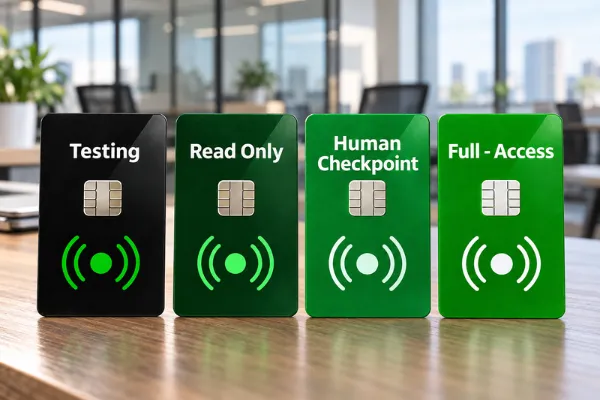
Move every agent through these stages in order. Each stage is a checkpoint, not a formality.
Stage 1: Sandbox Testing (No Live Access)
Before an agent touches real software, run it in a closed test environment with dummy data. Feed it messy inputs, vague instructions, and deliberate errors. Watch how it fails. That tells you what instructions you need to build into it more than watching it succeed.
Stage 2: Read-Only Access
Connect the agent to live systems with permission to read and draft, but not to change anything.
Example: The agent reads incoming support requests and drafts replies. A team member reviews each draft and sends it.
Stage 3: Human Approval for High-Impact Actions
The agent prepares the work, and a trained person approves it before anything happens.
We recommend you keep these safeguards permanently:
Written messages to clients or the public, such as emails, texts, and chat replies that go beyond pre-approved templates
Charges, refunds, and discounts
Deleting files or records
Changing contract terms
Reassigning high-value leads
Live voice and chat agents are the exception, because a person can't approve each reply in real time. Control them by limiting what they're allowed to say and do and monitoring the agents to ensure they’re not operating outside your instructions, as described below.
Stage 4: Limited Autonomy (Internal, Reversible, Low-Risk Only)
Grant limited autonomy only after the agent has a documented track record. Even then, restrict autonomous actions to internal tasks that clients never see and that are easy to undo.
Example: Tagging project tasks, filing documents into internal folders, or logging system uptime.
What About AI Voice Agents?
A voice agent answering calls operates on its own during the conversation, so the safeguard shifts from approving messages to limiting authority.
A defined scope. The agent handles specific tasks, such as answering common questions, booking appointments, or taking messages, and nothing else.
An approved knowledge source. It answers only from information your team has written and reviewed.
No commitments. It can handle a quote range, but cannot give custom pricing, approve refunds, make exceptions, or promise outcomes. Those requests go to a person.
Clear handoff rules. It transfers to a person when a caller is upset, asks something outside its scope, or asks for a human.
Disclosure. Tell callers they're speaking with an AI assistant. Some states require bot disclosure in certain situations, and it protects trust regardless.
Call review. Agents require ongoing training. A designated person must review a sample of recordings or transcripts on a regular schedule, and flag every call that ended in a complaint or transfer. This enables the company to ensure the AI assistant’s instructions are updated or additional training is provided so it continues to improve its call performance.
Consent for outbound calls. The FCC ruled in 2024 that AI-generated voices count as "artificial" voices under the Telephone Consumer Protection Act, so outbound AI calls generally require the recipient's prior consent.
In highly regulated environments (e.g., medical, treatment, behavioral health) treat an AI Voice Agent on admissions or front-desk lines as a patient-facing system. Callers will share treatment information, so it needs the same vendor agreements and data protections as any system handling client records.
When to move an agent up a stage. No industry standard exists yet at the time of this post. As a starting point, we recommend at least 30 days at the current stage, a reviewed sample of its work with no errors that would have reached a client or a record, and sign-off from the agent's named owner. Set your own thresholds, write them down, and apply them consistently. In our RISE Method, this is the Evaluate step. Promotion comes from evidence, not from a vendor's confidence.
Where AI Agents Belong: General Business vs. Behavioral Health
General Business Operations
In most companies, agents can take on a wide range of work, but access still needs limits. An agent with open access to your CRM or billing system can:
Overwrite historical customer records during an automated sync
Send refunds, discounts, or cancellation confirmations nobody approved
Flood vendor inboxes when a workflow gets stuck on a loop
Surface payroll data, executive notes, or financial files in a chat reply to an outside user
Medical, Behavioral Health, and Treatment Providers
In substance use disorder treatment, mental health, and other healthcare settings, the stakes are higher. Substance Use Disorder (SUD) records are protected by both HIPAA and 42 CFR Part 2. Since February 16, 2026, Part 2 has carried HIPAA-style penalties and breach notification requirements, and HHS's Office for Civil Rights is actively accepting complaints.
Small mistakes matter here. A reminder text sent from a program's name, or a calendar invite sent to the wrong address, can reveal that someone is in treatment. That can be an impermissible disclosure.
Our recommendation is to keep autonomous agents out of the EHR, clinical documentation, and patient communications until all of the following are in place:
A signed business associate agreement (BAA) with the vendor
Confirmation that patient consents cover the use
Access limited to the minimum necessary
Audit logging you control
A documented review by your compliance lead or counsel
Until then, start agents on work that never touches patient information:
Ordering and tracking supplies, including drug screening kits, office supplies, and kitchen stock for residential sites
Logging facility maintenance requests for HVAC, plumbing, and repairs
Tracking staff certification deadlines, such as CPR renewals
Scheduling fleet vehicle maintenance
Unapproved AI use by staff is a related risk in these settings. We cover it in [What Is Shadow AI in Behavioral Health? (And Why Licensure Depends on Fixing It).
Essential Guardrails Before You Turn an Agent On
Its own credentials with limited permissions. Never connect an agent with an administrator login. Create a separate account or API key that can reach only what its task requires.
Action and rate limits. Cap how many actions the agent can take per hour. A cap is what stops a looping agent from sending 500 duplicate emails.
Logs the agent can't edit. Record every request, action, and output in a system the agent has no permission to change.
A named owner and a kill switch. Every agent needs a person responsible for it. That person should know exactly how to revoke its access and pause it within minutes, and should have practiced doing it.
Protection against hidden instructions. Agents that read emails, documents, or web pages can be manipulated by instructions planted in that content. This is called prompt injection. An agent that reads outside content should never be allowed to take high-impact actions without human approval.
A clear data policy with the vendor. Know what the vendor stores, how long it keeps data, and whether your data trains its models. See [Is It Safe to Use AI Tools That Train on Your Business Data?]
A staff briefing. Your team should know what each agent does, what it is not allowed to do, and who to tell when something looks wrong. Agents fail quietly when nobody knows they are supposed to be watching.
AI agents can return hours to your team each week. That only happens when an agent has one clear job, limited access, and a person accountable for its work. Start narrow, prove it works, and expand from there.
Frequently Asked Questions
What does the Principle of Least Privilege mean for AI agents?
It means an agent gets only the minimum permissions, system access, and data needed for its assigned task, and nothing more. If the agent drafts support replies, it can read the support inbox. It cannot reach billing, HR, or your file server.
Is an AI receptionist or voice AI an AI agent? It depends on what it does. Voice AI is the listening and speaking layer. A basic phone menu that routes calls is not an agent. A voice system that understands callers, makes decisions, and books appointments or updates records is an agent. Because it talks to callers in real time, you can't approve each reply. Instead, limit its scope, keep it from making commitments, set handoff rules, and review its calls on a schedule. In highly regulated environments (e.g., medical, SUD treatment, behavioral health), a voice agent answering admissions or front-desk calls will hear callers share treatment information. Treat it as a patient-facing system.
Can treatment programs and healthcare providers use AI agents safely?
Yes. The safest path is to start with operational work that never touches patient information, such as supplies, maintenance, and staff credential tracking. Any use involving patient records requires a business associate agreement, consent review, minimum necessary access, and compliance sign-off first.
Who is responsible if an AI agent makes a costly mistake?
Your company. Most AI vendor terms limit the vendor's liability and leave monitoring and safeguards to the customer. Courts and regulators have been unwilling to accept "the AI did it" as a defense. In Moffatt v. Air Canada (2024), a Canadian tribunal held the airline responsible for incorrect information its website chatbot gave a customer.
Should an AI agent be allowed to edit our CRM directly?
Not at first, and not for high-impact changes. Have the agent write proposed changes to a staging field or a review queue, and have a person approve them. Direct write and delete access risks corrupted or overwritten customer history.
How do we monitor agents without watching them all day?
Review a sample of its work on a fixed schedule, such as weekly. Evaluate the system and document what the agent is doing. That way you know if the agent hits repeated errors, or tries to access something outside its permissions.
Ready to Establish Voice AI in Your Operations? Before an AI agent touches your systems, you need a policy that defines what AI can access, what needs human approval, and who is responsible. In a 15-minute call, we'll talk through the tools you're using or considering and how our AI Use Technology Toolkit helps you build that policy.
Schedule a Call With Us: https://calendly.com/micheledavisnyc/15-minute-meeting
Related Reading
Is It Safe to Use AI Tools That Train on Your Business Data?
Why Won't My Team Use the AI Tools We Paid For?
What Is Shadow AI in Behavioral Health? (And Why Licensure Depends on Fixing It)